Mikrotik-TIM-MTU
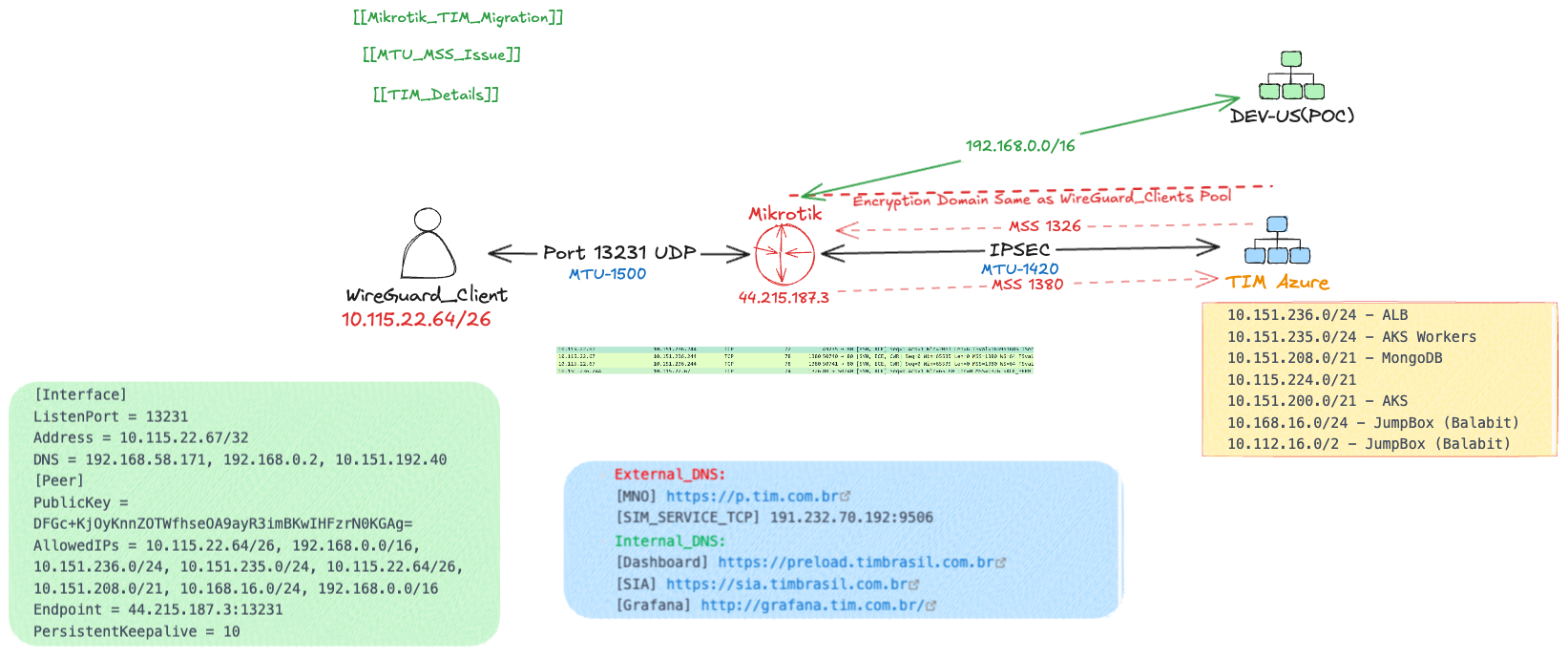
Wireguard uses MTU 1500, since the end client also need to connect to additional site over IPSEC. IPSEC will use lower MTU 1420 or 1380, since this is the case the MSS needs to be changed also to lower value. MSS = MTU - (TCP header size + IP header size)
Key Considerations
- Starting MTU for WireGuard: 1500 bytes.
- WireGuard Overhead: • IPv4: 60 bytes. • IPv6: 80 bytes.
- Effective MTU After WireGuard: • For IPv4: 1500 - 60 = 1440 bytes. • For IPv6: 1500 - 80 = 1420 bytes. IPsec Overhead (depends on mode and encryption, commonly ~60 bytes): Subtract an additional 60 bytes for IPsec. New MTU: • For IPv4: 1440 - 60 = 1380 bytes. • For IPv6: 1420 - 60 = 1360 bytes. TCP Headers: MSS must exclude TCP and IP headers: • IPv4: Subtract 40 bytes (20 for TCP + 20 for IP). • IPv6: Subtract 60 bytes (20 for TCP + 40 for IP). Final MSS Calculation • IPv4 MSS: 1380 - 40 = 1340
Tools used: 🧰
mtu_path
mtupath.exe -4 10.168.16.84
mac ping 192.168.58.171 -D -s 1380
curl -o /dev/null -s -w 'Total: %{time_total}s\n' https://grafana.tim.com.br
on mikrotik:
:local yes
:local no
:local test

#Set upper and lower test limits below
:set yes 1000
:set no 1550

while (($no-$yes) > 1) do={

  :set test (($no-$yes)/2 + $yes)
  if ([/ping 10.151.212.48 src-address=10.115.22.65 do-not-fragment count=1 size=$test] = 1) do={ :set yes $test } else={ :set no $test }

}

:put $yes
Client ➡ Wireguard 1500 ➡ IPSEC 1420
Correct MSS
![[Screenshot 2024-12-19 at 21.34.19.png]]
[!note] Links - https://dimitrije.website/posts/2022-10-09-wireless-fob-with-mikrotik-and-wireguard.html
Network Layout
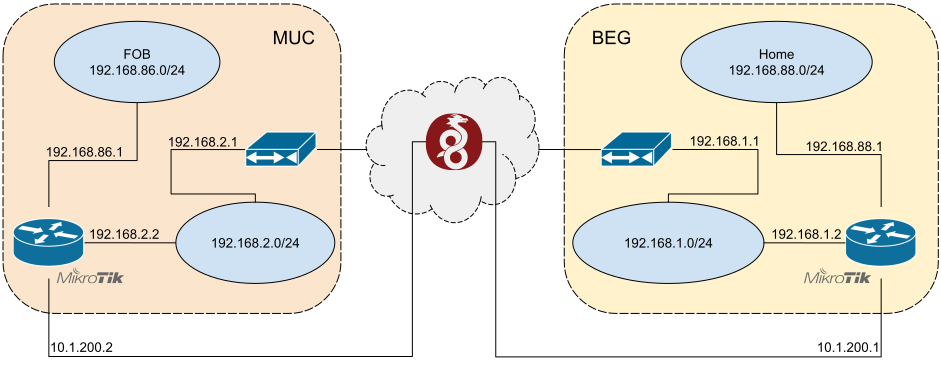
In the image above, I want to route all traffic going out of FOB network (192.168.86.0/24) through MikroTik router in BEG. This will also allow bidirectional traffic between hosts in FOB and Home network.
Step One: Wireguard Tunnel Setup
Wireguard is pretty easy to set up: for both sides, one needs to pick a port for Wireguard interface to listen on, generate private/public key pair, assign Wireguard addresses, and have a public IP for one peer. Oh, and incoming Wireguard UDP traffic (yes, UDP2) needs to be NAT-ed through the ISP modem to MikroTiks on both sides.
I picked the same port, for simplicity. RouterOS automatically generates a key pair when Wireguard interface is created. And, as shown in diagram above, I settled on 10.1.200.1 for BEG, and 10.1.200.2 for MUC as Wireguard IP addresses. I get down to work:
# On BEG MikroTik
# Set up wireguard interface. This will also generate private/public keypair.
/interface wireguard
add listen-port=13231 mtu=1420 name=wireguard1

# Assign address to the router on the new interface.
/ip address
add address=10.1.200.1/24 comment="Wireguard" interface=wireguard1 \
    network=10.1.200.0

# Allow incoming UDP traffic on listen port. ether1-gateway is connected to
# BEG ISP modem (192.168.1.1).
/ip firewall filter
add action=accept chain=input comment="Wireguard" dst-port=13231 \
    in-interface=ether1-gateway protocol=udp

# Set up MUC peer.
/interface wireguard peers
add allowed-address=10.1.200.2/32 comment="FOB" \
    endpoint-port=13231 interface=wireguard1 public-key=\
    "If7ysNHrNZ2PmoVW1ckVL1FQApOBPORTAWgAq82zXSA="
And on the other side:
# On MUC MikroTik
# Set up Wireguard interface. This will also generate private/public keypair.
/interface wireguard
add listen-port=13231 mtu=1420 name=wireguard1

# Assign address to the router on the new interface.
/ip address
add address=10.1.200.2/24 comment="Wireguard" interface=wireguard1 \
    network=10.1.200.0

# Allow incoming UDP traffic on listen port. ether1-gateway is connected to
# MUC ISP modem (192.168.2.1).
/ip firewall filter
add action=accept chain=input comment="Wireguard" dst-port=13231 \
    in-interface=ether1-gateway protocol=udp

# Set up BEG peer.
/interface wireguard peers
add allowed-address=0.0.0.0/0 comment="Home" \
    endpoint-address=<domain> endpoint-port=13231 interface=wireguard1 public-key=\
    "If7ysNHrNZ2PmoVW1ckVL1FQApOBPORTAWgAq82zXSA="
One peculiarity regarding Wireguard is that it has no concept of client and server. Every Wireguard tunnel is a peer-to-peer network. Wireguard configuration contains interface configuration, and peer configuration stanza for each peer. Hence similar configuration on two sides, using reciprocal values for public keys, and endpoint and listen ports. There are only two notable differences between MUC and BEG:
-
The public IP of BEG is set as an
endpoint-addresson the MUC side, so that MUC can initiate the connection. Empty endpoint address means that peer is allowed to have any public address. However, if endpoint addresses on both sides were empty, neither side would be able to “dial in” and initiate the connection.<domain>above refers to dynamic IP domain that is updated with the public IP of the BEG ISP modem every hour or so by a script. This will prove important couple of paragraphs below. -
Catch-all
0.0.0.0/0is used as theallowed-addresson the MUC side. Regardless of MikroTik routing configuration, only traffic that is destined toallowed-addresscan be routed through the tunnel. BEG side can only send traffic to10.1.200.2through the tunnel.
A careful reader might have noticed that Wireguard interface MTU is set to 1420 bytes, whereas Ethernet MTU3 is 1500 bytes. The difference comes from Wireguard packet header, which is 60 bytes for IPv4, or 80 for IPv6. See this email for more details.
With Wireguard configured on both routers, I was able to ping each side, as routes to 10.1.200.0/24 via wireguard1 were automatically added during address assignment:
Step Two: Routing the Traffic
Now I can tell MUC MikroTik to route all traffic through the tunnel, meaning that default route should be changed to route 0.0.0.0/0 through wireguard1 interface.
But what if Wireguard connection fails, for whatever reason? With default route unresponsive, no Internet traffic would be able to go through. And this means Wireguard tunnel could never be re-established after that point.
There are a couple of options here: I could monitor Wireguard tunnel health, and route all traffic through the tunnel while healthy. When it goes down, I could revert the default route to go through MUC ISP modem. But this sounds too complex, error prone, and would require some scripting.
Another way to go about this is to use a different routing table. I can set up a separate routing table, with its own default route that routes traffic through the tunnel, for all FOB network hosts that connect to MUC MikroTik. The router itself would use the default routing table. Should the tunnel fail, clients on FOB network wouldn’t be able to access the Internet, but the router itself would. The router could self-heal by re-establishing the tunnel once possible. This is much simpler than the option above:
# On MUC MikroTik
# Create a new routing table.
/routing table
add comment="For use by local clients" disabled=no fib name=wireguard

# Set up default route for the new routing table that routes all traffic through
# the tunnel.
/ip route
add dst-address=0.0.0.0/0 gateway=wireguard1 routing-table=wireguard

# Add a routing rule that makes all hosts on FOB network use the new routing
# table. Interface bridge bridges together ethernet and wireless interfaces
# (this is the default config).
/routing rule
add action=lookup-only-in-table \
    comment="Local clients should use (only) Wireguard routing table" \
    disabled=no interface=bridge src-address=192.168.86.0/24 table=wireguard
Now whenever I connect to MUC MikroTik, either through WiFi or Ethernet, and check my public IP address with curl http://myip.dnsomatic.com, I get public IP from BEG! Great success!
Step Three: DNS
There are a few rough edges left to smooth out. First, MUC MikroTik is still configured to use 192.168.2.1 (MUC ISP modem) as DNS server. The modem obtains its DNS settings via DHCP, and will most likely be configured to use ISP nameservers, which are located in Germany. There are two reasons why this is not optimal for me:
-
It’s well known that some authoritative DNS nameservers use IP address of recursive resolvers, along with client subnet, to load balance traffic such that frontends geographically closest to the user are preferred. I might get load-balanced to use servers closer to Germany, rather than servers closer to Serbia, even though packets will flow through BEG MikroTik.
-
I have a Pi-hole set up in my Home network, and it does a marvellous job at blocking annoying ads. I’d like to make use of this in FOB network as well.
Because of this, I want to use 192.168.88.1 (BEG MikroTik) as DNS server when resolving domains in FOB network:
And this is where things stopped working. I was not able to resolve domains at all. Hmmm, let’s try pinging the resolver:
# On MUC MikroTik
/ping count=3 192.168.88.1
  SEQ HOST                                  SIZE TTL TIME       STATUS
    0 <redacted>                              56 254 11ms344us  net unreachable
    1 <redacted>                              56 254 9ms832us   net unreachable
    2 <redacted>                              56 254 10ms237us  net unreachable
    sent=3 received=0 packet-loss=100%
Well, that sucks. MUC MikroTik cannot get through BEG MikroTik by using its Home network IP. No wonder DNS queries don’t work. Ah, but this is because the router uses the default routing table which routes all traffic through MUC ISP modem!
All right, let’s add a default route table entry that will route traffic to Home network through the tunnel:
# On MUC MikroTik
/ip route
add disabled=no dst-address=192.168.88.0/24 gateway=wireguard1 \
    routing-table=main

/ping count=3 192.168.88.1
  SEQ HOST                                     SIZE TTL TIME       STATUS
    0 192.168.88.1                               56  64 45ms398us
    1 192.168.88.1                               56  64 40ms957us
    2 192.168.88.1                               56  64 66ms114us
    sent=3 received=3 packet-loss=0% min-rtt=40ms957us avg-rtt=50ms823us...
Hey, it worked! And DNS queries now work as well.
However, there is a more subtle issue at play here: I’m changing router DNS server configuration. By default, this setting also affects hosts in FOB network: DHCP server on MUC MikroTik will set 192.168.86.1 (MUC MikroTik) as DNS server when it suggests dynamic IP configuration to hosts. MikroTik acts as a recursive resolver, with its own DNS cache, and will ultimately forward DNS requests from FOB hosts to whatever its DNS server is.
While I do want hosts on FOB network to use 192.168.88.1 (BEG MikroTik) as DNS server, I don’t want MUC MikroTik to do that. Why? We go back to the issue of tunnel going down: if the tunnel is down, and the resolver is reached through the tunnel, DNS queries will stop working. And since I use a domain name as endpoint-address in Wireguard peer config, that domain name will need to get resolved in order to get the tunnel back online. See the problem? And yes, I learned this the hard way.
New objective – hosts on FOB network use 192.168.88.1 (BEG MikroTik) as DNS, the router itself uses 192.168.2.1 (MUC ISP modem) as DNS:
# On MUC MikroTik
# Revert back to using MUC ISP modem as DNS server for the router.
/ip dns
set allow-remote-requests=yes servers=192.168.2.1

/ip dhcp-server print
Columns: ADDRESS, GATEWAY, DNS-SERVER
# ADDRESS          GATEWAY       DNS-SERVER
0 192.168.86.0/24  192.168.86.1  192.168.86.1

# Change FOB DHCP network config to use BEG MikroTik as resolver.
/ip dhcp-server network
set 0 dns-server=192.168.88.1
Noice! Having DNS server specified in DHCP server settings is also aligned with having a custom routing table for FOB hosts, as it will only pertain to FOB hosts, and not the router itself.
Step Four: MTU and MSS
The last part of this saga is about a weird issue I encountered after couple of days of happily using this setup. I noticed that some sites simply did not load. For example, Reddit and Stack Overflow appeared to be plain broken. Browsers would display a loading spinner, and request would eventually timeout.
Running curl -sv https://redit.com showed the following:
*   Trying 151.101.193.140:443...
* Connected to reddit.com (151.101.193.140) port 443 (#0)
* ALPN, offering h2
* ALPN, offering http/1.1
* successfully set certificate verify locations:
*  CAfile: /etc/ssl/cert.pem
*  CApath: none
* (304) (OUT), TLS handshake, Client hello (1):
} [315 bytes data]
And it would just hang there, waiting to complete TLS handshake. Server Hello message would never come.
This thread was a Google search away, and it suggested to add the following mangle rule:
# On MUC MikroTik
/ip firewall mangle
add action=change-mss chain=forward \
    comment="Reduce outgoing MSS to 1420 (MTU) - 40" disabled=no new-mss=1380 \
    out-interface=wireguard1 protocol=tcp tcp-flags=syn tcp-mss=1381-65535
Sure enough, this fixed the issue and both Reddit and Stack Overflow were now loading just fine.
But why? What was the issue, and what is MSS, anyway?
MSS4 stands for maximum segment size, and is a property that applies at TCP, or transport layer (OSI L4). MSS denotes maximum TCP payload size. Packets with payloads that go over MSS are dropped.
MSS is announced independently by both sides during TCP 3-way handshake. It is specified in both SYN and SYN-ACK packets. Each side of TCP connection should honor MSS declared by the other endpoint, by fragmenting application data into multiple TCP packets so that they fit within MSS. When done correctly, it also avoids further fragmentation at the IP layer (OSI L3) due to MTU, which is, as we can see, intimately related to MSS.
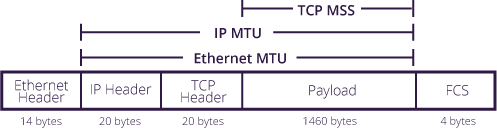
The image above5 shows how MSS and MTU are related. In general, MSS should be equal to MTU minus TCP header (20 bytes) minus IP header (20 bytes). For common Ethernet MTU of 1500 bytes, MSS should be 1460 bytes. But Wireguard interface has a smaller MTU – just 1420 bytes, which corresponds to MSS of 1380 bytes. Could it be that some TCP packets were being dropped by the router because MSS was being exceeded? This would explain TLS handshake timeouts I was seeing.
To test my hypothesis, I fired up Wireshark on my laptop, connected via WiFi to MUC MikroTik. Then I set up packet sniffer on BEG MikroTik to capture packets at the same time. Next, I ran the curl command again, captured the packets, and compared the results. Here’s a screenshot of what Wireguard captured:

My laptop is on FOB network with IP of 192.168.86.254. I can see that the first packet from my laptop to Reddit server is your standard TCP SYN packet that declares MSS of 1460 bytes. Then I see a SYN ACK packet from Reddit server to my laptop that declares the same MSS of 1460 bytes. This is followed by ACK from my laptop, a Client Hello TLS handshake initiation from my laptop, and ACK from Reddit server letting me know that it has received the Client Hello message.
And now for the weird thing – the next packet received by my laptop is marked as TCP continuation data, meaning that its TCP payload represents a chunk of data that is to be appended to previously received TCP payload. That I never received.
Now let’s look at what BEG MikroTik captured – note that 192.168.1.2 is BEG MikroTik address on ether1-gateway interface. Also note that IP-PACKET-SIZE is equal to Wireguard packet size minus 14 bytes for Ethernet header:
# On BEG MikroTik
/tool sniffer packet
print proplist=interface,direction,tcp-flags,ip-packet-size,src-address
 # INTERFACE       DIRECTION TCP-FLAGS IP-PACKET-SIZE SRC-ADDRESS                DST-ADDRESS
 0 wireguard1      rx        syn       64             192.168.86.254:54300       151.101.65.140:443 (https)
 1 ether1-gateway  tx        syn       64             192.168.1.2:54300          151.101.65.140:443 (https)
 2 ether1-gateway  rx        syn       60             151.101.65.140:443 (https) 192.168.1.2:54300
                             ack
 3 wireguard1      tx        syn       60             151.101.65.140:443 (https) 192.168.86.254:54300
                             ack
 4 wireguard1      rx        ack       52             192.168.86.254:54300       151.101.65.140:443 (https)
 5 ether1-gateway  tx        ack       52             192.168.1.2:54300          151.101.65.140:443 (https)
 6 wireguard1      rx        psh       372            192.168.86.254:54300       151.101.65.140:443 (https)
                             ack
 7 ether1-gateway  tx        psh       372            192.168.1.2:54300          151.101.65.140:443 (https)
                             ack
 8 ether1-gateway  rx        ack       52             151.101.65.140:443 (https) 192.168.1.2:54300
 9 wireguard1      tx        ack       52             151.101.65.140:443 (https) 192.168.86.254:54300
# Note that packets 10 and 11 do not get transmitted to wireguard1 interface.
10 ether1-gateway  rx        ack       1500           151.101.65.140:443 (https) 192.168.1.2:54300
11 ether1-gateway  rx        psh       1500           151.101.65.140:443 (https) 192.168.1.2:54300
                             ack
12 ether1-gateway  rx        psh       675            151.101.65.140:443 (https) 192.168.1.2:54300
                             ack
# Packet 13 corresponds to Continuation Data packet on my laptop.
13 wireguard1      tx        psh       675            151.101.65.140:443 (https) 192.168.1.2:54300
                             ack
# Packet 14 is duplicate ACK (same as #5) that my laptop sends to Reddit server.
14 wireguard1      rx        ack       64             192.168.86.254:54300       151.101.65.140:443 (https)
15 ether1-gateway  tx        ack       64             192.168.1.2:54300          151.101.65.140:443 (https)
16 ether1-gateway  rx        ack       1500           151.101.65.140:443 (https) 192.168.1.2:54300
17 ether1-gateway  rx        ack       1500           151.101.65.140:443 (https) 192.168.1.2:54300
18 ether1-gateway  rx        ack       1500           151.101.65.140:443 (https) 192.168.1.2:54300
19 ether1-gateway  rx        ack       1500           151.101.65.140:443 (https) 192.168.1.2:54300
20 wireguard1      rx        rst       40             192.168.86.254:54300       151.101.65.140:443 (https)
                             ack
21 ether1-gateway  tx        rst       40             192.168.1.2:54300          151.101.65.140:443 (https)
                             ack
Because MikroTik BEG is a router (duh), it will masquerade all packets that are destined to go through the default route: their source address is replaced with router’s source address, and when response packets are received, their destination address is replaced with the original source address, and they are forwarded further on. In the excerpt above:
-
every packet received on
wireguard1interface from192.168.86.254should be transmitted onether1-gateway, with source address changed to192.168.1.2, and -
every packet received on
ether1-gatewayinterface from Reddit server should be transmitted onwireguard1interface, with destination address changed to192.168.86.254.
This holds true for first three SYN, SYN-ACK and ACK packets (packets #0 to #5), Client Hello packet (packets #6 and #7), and ACK from Reddit server (packets #8 and #9). Their IP packet sizes match what we see in Wireguard, when we add 14 bytes for Ethernet header.
But I can see that packet #10 received from Reddit server is not forwarded back to wireguard1. If I look closely at IP packet size, I see that it is 1500 bytes, which is over Wireguard interface MTU. On the other hand, IP packet size of 1500 does mean that advertised MSS (by my laptop) of 1460 is being respected. The same happens to packet #11. Since packet #12 has IP packet size less than Wireguard MTU, it is transmitted to wireguard1, and corresponds to the continuation data packet that I captured on my laptop. I can only assume packets #10 through #12 are TCP-segmented packets containing Server Hello message.
This is enough evidence for me – because client MSS is advertised as 1460, some servers may choose to send packets that are bigger than Wireguard MTU, and will be dropped as result. Now, the mangle rule above changes MSS in outgoing SYN packets to 1380 bytes, meaning that the biggest IP packet size can be 1420, which is equal to Wireguard MTU. As a result, these packets will not be dropped.
Why does router drop packets that are bigger than Wireguard MTU instead of breaking them down into MTU-sized fragments? I assume this is because DF (Don’t Fragment) flag is set in IP header in all packets I inspected.
While reading about this topic, I found out about this nifty algorithm called Path MTU Discovery (PMTUD). I wonder why it did not work here? Had this worked out, Reddit server would have figured out that lowest MTU on packet path to my laptop was 1420, thus adjusting TCP packet size. The alternative to PMTUD is to do MSS clamping, which appears to be a technical term for what I ended up doing.